
3 November 2024
Guide to tracking AI traffic in Google Analytics 4

AI chatbots are becoming an increasingly significant source of website traffic, making it important to group AI-related traffic into a separate channel for better analysis.

In GA4, traffic from AI sources is currently categorised under "Referral". A Custom Channel Group helps separate this unique traffic source, making data collection easier and providing more detailed insight.
An AI Traffic Channel Group in GA4 can be used as a primary or secondary dimension in Reports, giving you a more detailed and flexible analysis of traffic from AI sources.
Channel Groups can also be applied retroactively, meaning you can immediately analyse historical traffic from AI sources without having to wait for new data. In many cases, traffic from sources such as ChatGPT, Perplexity and Gemini already exists.
Segment, track and analyse AI traffic in Google Analytics 4
Follow the steps below to create a new AI Traffic Channel Group in GA4:
1. Go to GA4 Admin > Data Streams > Channel groups.
2. Click the three dots next to Default channel group and select 'Copy to create new'.
3. Name your new channel group, e.g. Channel Group 2.
4. Click the 'Add new channel' button.
5. Name the new channel 'AI Traffic'.
6. Add the following Condition to define your new Custom Channel:
Source matches regex
^(.*ai|.*\.openai.*|.*copilot.*|.*chatgpt.*|.*gemini.*|.*perplexity.*|.*heavy.*|.*claude.*)$
7. Click the 'Save Channel' button.
8. Click 'Reorder' and drag 'AI Traffic' to just above 'Referral'. This ensures that AI traffic is attributed correctly before it risks being incorrectly categorised as referral traffic.
9. Click 'Save group'.
10. Navigate to Reports > Acquisition > Traffic acquisition.
11. Scroll down to the table and change the Primary Dimension to the new Channel Group you created.
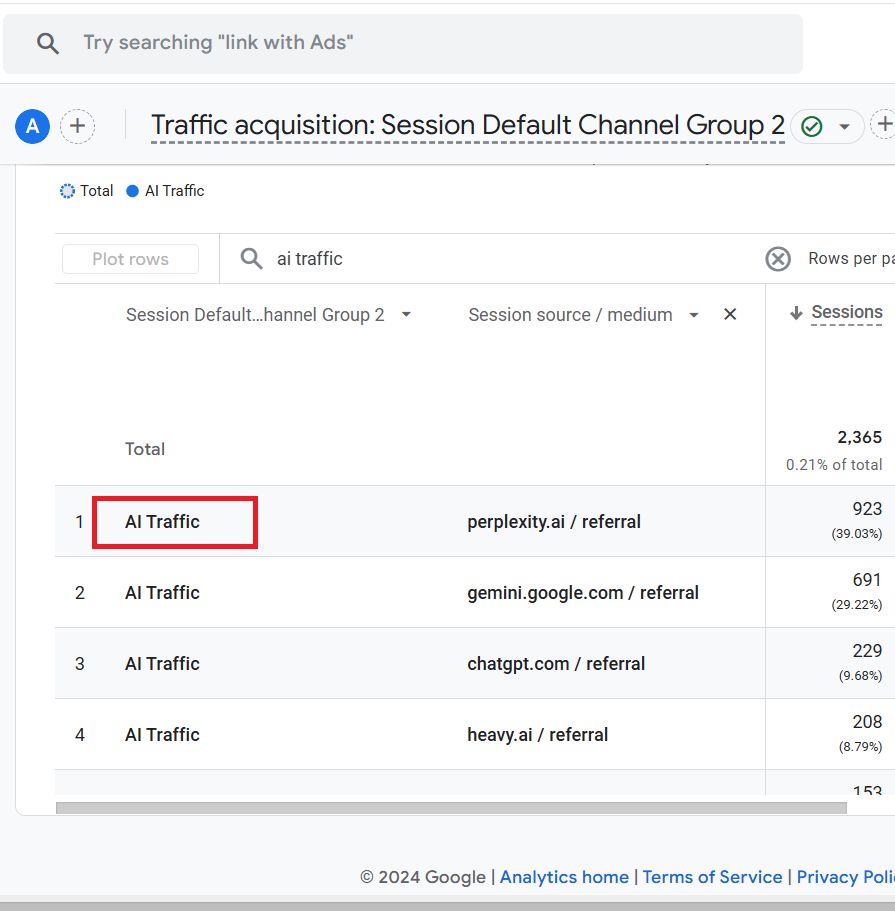
12. If your GA4 property records traffic from AI sources, you should now see traffic from AI sources reported via the 'AI Traffic' channel.
13. Type 'AI Traffic' in the search box and press enter to filter for the AI Traffic Channel Group.
14. Add a secondary dimension to the data table called 'Session source/medium'.
You should now see a data table similar to the one below:
Maximise your digital marketing with AI-driven strategies from DigitalMassa
We combine AI-assisted analysis with tailored strategies to elevate your brand, drive leads and increase sales. With a focus on your entire digital presence, from advertising to branding, we create a cohesive strategy that delivers real results.
Let us strengthen your market position and create long-term growth. Are you ready to see what AI and data-driven marketing can do for your company?
Contact us today for a consultation on how you can implement AI in your digital strategy.

Daniel Masajada
Categories:
Marketing Uncategorized